
Every Issue Tracked From Report to Resolution
Complete support ticket system with auto-generated tracking numbers. Assign, prioritize, and resolve — with a full audit trail.
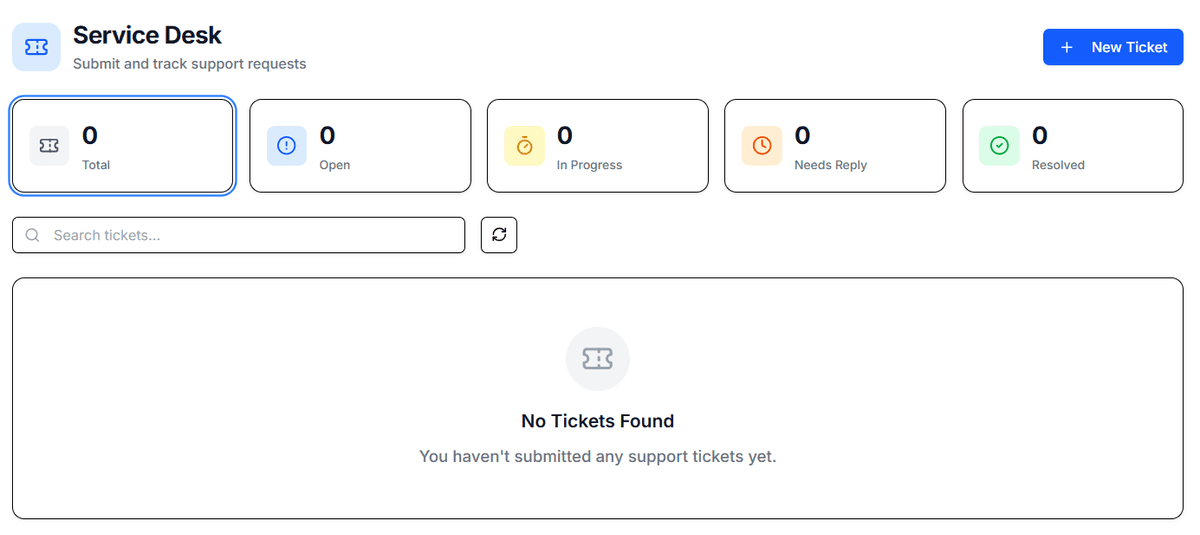
A Help Desk Built for Fleet Operations
Text messages and sticky notes lose issues. A proper ticketing system ensures nothing falls through the cracks.
Auto-Generated Ticket IDs
Every ticket gets a unique ID like ACME-000001. Easy to reference in emails, calls, and reports.
Priority and Status Tracking
Four priority levels and configurable status stages keep the queue organized and SLAs visible.
Assignment Workflows
Route tickets to the right team member based on type, priority, or location. Assignments trigger notifications.
Two-Way Communication
Submitter and handler can exchange messages on the ticket. Full conversation history preserved.
Complete Audit Trail
Every status change, comment, and assignment logged with user ID and timestamp.
Mobile-Friendly Submission
Drivers submit tickets from their phone. Vehicle and driver info auto-populated from their session.
From Issue to Resolution in Four Steps
Submit a Ticket
Anyone in the organization can submit a ticket from their phone or desktop. Describe the issue, set priority, attach photos.
Ticket Gets Assigned
Fleet managers or auto-routing assigns the ticket to the appropriate handler. The handler is notified immediately.
Communicate and Resolve
The handler works the issue, adds notes, and communicates with the submitter — all within the ticket.
Close with Documentation
When resolved, close the ticket with a resolution summary. The full history is retained for reference.
Frequently Asked Questions
Related Features
Ready to See It in Action?
Start your free trial today. No credit card required — set up your fleet in minutes.