
Inspections That Actually Happen
Build custom checklists for each vehicle type. Drivers complete them on their phone with required photos. Every checkbox tracked — no more 'I forgot.'
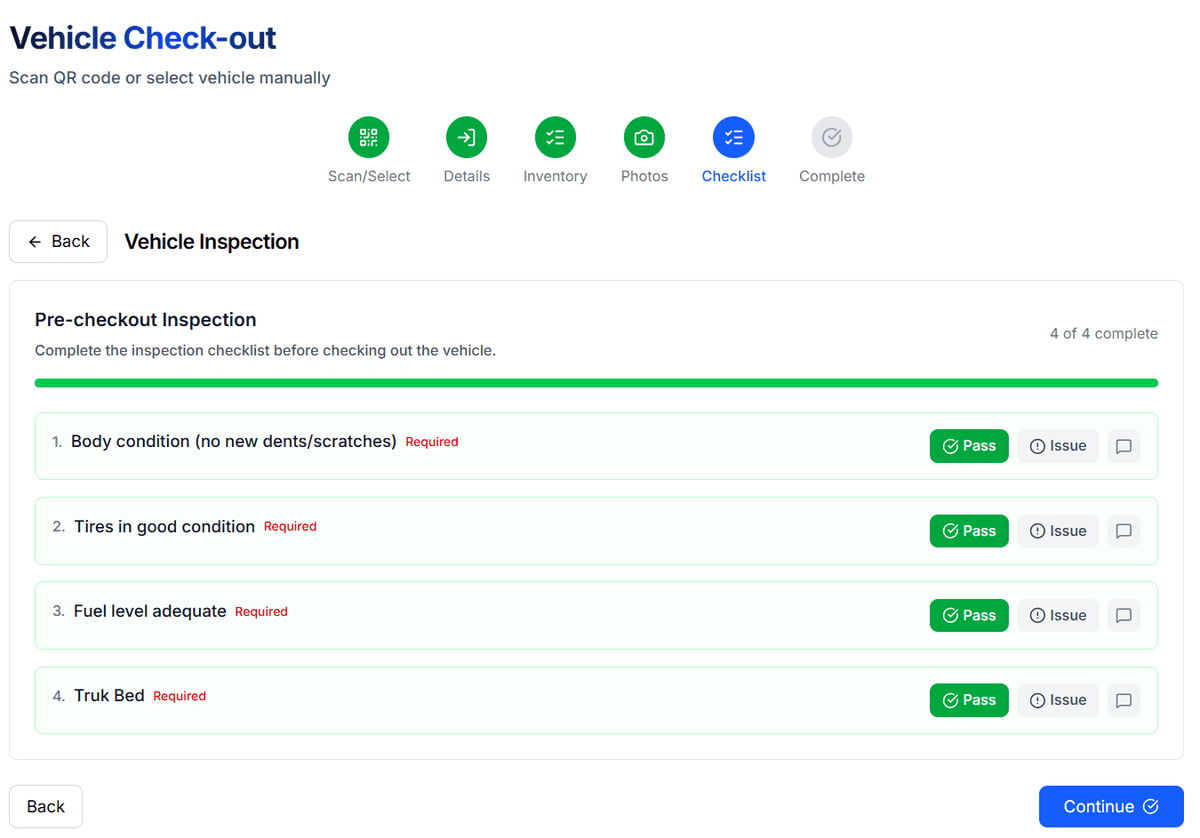
Inspections Your Drivers Will Actually Complete
Paper checklists get lost. VehiX360 makes inspections fast, mobile, and impossible to skip.
Custom Checklist Builder
Drag-and-drop builder for inspection templates. Different checklists for different vehicle types — sedan, truck, heavy equipment.
Photo-Required Items
Mark checklist items as photo-required. Drivers must capture evidence before marking an item complete.
Pass/Fail Tracking
Each item can be pass, fail, or N/A. Failed items trigger alerts and can block vehicle checkout.
Pre-Built Templates
Start with industry-standard templates for DOT pre-trip, daily walkaround, or return inspections. Customize to fit your fleet.
Automatic Reports
Inspection results compiled into structured reports with photos, timestamps, and driver info. Export as PDF or CSV.
Compliance-Ready Records
Every inspection stored with full audit trail. 180-day retention with searchable records for audits and compliance.
Complete an Inspection in Minutes
Select or Scan the Vehicle
Driver scans the vehicle QR code or selects it from the fleet list. The correct checklist loads automatically based on vehicle type.
Walk Through the Checklist
Each item shows on screen one at a time. Driver marks pass, fail, or N/A. Photo-required items open the camera automatically.
Add Notes on Any Issue
Free-text fields let drivers describe problems in detail. Attach additional photos for context.
Submit and Go
One tap to submit. The inspection record is saved instantly. Fleet managers see results in real time on the dashboard.
Frequently Asked Questions
Related Features
Ready to See It in Action?
Start your free trial today. No credit card required — set up your fleet in minutes.